|
| |

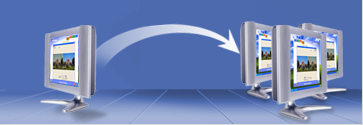
BeamYourScreen to proste, szybkie i pewne oprogramowanie do udostępniania uczestnikom telekonferencji ( do 20 uczestników ) pulpitu swojego komputera. Uczestnicy
telekonferencji mogą zdalnie widzieć wszystkie aplikacje uruchomione na Twoim komputerze.
BeamYourScreen sprawdza się przede wszystkim w:
 prowadzeniu prezentacji handlowych (np. Prezentacje oprogramowania prowadzeniu prezentacji handlowych (np. Prezentacje oprogramowania
pokazywaniu wersji demo oprogramowania
prowadzeniu spotkań online
we wsparciu informatycznym użytkowników końcowych (helpdesk)
organizowaniu konferencji i szkoleń online
BeamYourScreen jest niewiarygodnie szybki, łatwy w obsłudze a przy tym bezpieczny. Abonamentowy system sprzedaż dostosowany jest do różnych potrzeb i
częstotliwości wykorzystywania programu.
Główne zalety:
-
Możliwość pracy zdalnej poprzez udostępnienie swojego ekranu pozwala zaoszczędzić czas i pieniądze w codziennej komunikacji.
-
Redukcja kosztów związanych z pozyskiwaniem i obsługą klientów
-
Wzrost sprzedaży poprzez lepszą komunikację z klientami i potencjalnymi klientami.  Instrukcje wersja pdf Guest
tutorial
| Host tutorial
| Product description
|
User guide
Instrukcje wersja pdf Guest
tutorial
| Host tutorial
| Product description
|
User guide
Zastosowanie :
With our proprietary desktop sharing technology guests can view the screen of the host user live over the Internet. Any application, document, design or
presentation can be evaluated in real time. Guests don't install any software – they connect instantly using their standard Internet browser.
| Sprzedaż |
BeamYourScreen is perfect for sales representatives, who want to conduct live product demonstrations or give presentations to prospective
customers. Enhance your telephone conversation and show your prospects what you see on your computer. Show presentation slides or demo software
products online and in real-time. |
| Współpraca |
Discuss project results and jointly work on documents during team meetings. There is no need to book meeting rooms in advance with
BeamYourScreen technology; no need to travel long distances. You can easily switch presenters during a meeting. Stay at your desk, collaborate
online, and make faster decisions. |
| Pomoc |
Use BeamYourScreen to enhance customer support. You can show solutions to customers’ problems on your desktop while you explain verbally
over the phone. With permission of your customer, you can see his screen and even remotely control his keyboard and mouse. Your customers connect
to your session through your web site. |
| Konsultacje |
BeamYourScreen is ideal for consultants, who need to easily and securely review account information and sensitive documents with clients. Show
documents and applications securely over the Internet. |
| Szkolenia |
Train people in remote locations. You can show any application and any document in real time. Your students use their standard Internet browser
to see your screen. |
Właściwości :
| Właściwość |
Opis |
| Wspóldzielenie Ekranu |
Show your screen to anyone over the Internet – instantly. Show any document, presentation, or
application in real-time. BeamYourScreen is fast, easy, and secure. |
| One-Click Start Sesji |
Start a session with just one click. No complicated meeting room reservations. No confusing meeting setup.
BeamYourScreen is so easy to use – you won’t need ANY training. |
| Intuicyjny Interfejs |
BeamYourScreen was designed with simplicity and ease-of-use in mind. No training is required. Start your
first online meeting in seconds and become an expert in minutes! |
| Jeden Dla Wielu |
You can invite multiple guests to your sessions. We offer five packages: (1:1), (1:5), (1:10), (1:15), and
(1:20). Guests always connect for free using their standard Internet browser. |
| Hide Screen |
You can hide your screen during an ongoing session to browse through confidential files or check your
e-mails. |
| Bez Instalacji |
Your guests don’t install any software. Guests use their standard Internet browser to view your
desktop. |
| Łatwe Logowanie Do Sesji |
Add a few lines of HTML code on your web site and guests can connect to your sessions through your own web
site. You don’t have to send them to BeamYourScreen. Integrate seamlessly with your existing web site and business processes. |
| Zoom Screen |
Don’t worry about your guests’ screen resolution. They can adjust the size of the viewing
window with just one click and always get the full picture. No more scrolling! |
| Pointer |
Your guests can click anywhere on the screen and you will see a flashing pointer for a few seconds to know
what they’re talking about. Online collaboration has never been easier. |
| True 24-Bit Color |
You want to show photos, illustrations, diagrams as they appear on your screen? We transmit images in true
color quality. |
| Full Screen |
Guests can switch to full screen mode with the F11 key on their keyboard. Task bar and window titles are
hidden and you have the full attention of your guests. No user interface that disrupts your presentations. |
| Raportowanie |
Access detailed session statistics in My Account. Track when your guests join and leave sessions and
improve the effectiveness of your online sessions. |
| Lista Uczestników |
Guests enter their name when they join a session. Every participant can see a list of all connected
guests. |
| Zmiana Prezenterów |
Switch presenters with a click to view the screen of one of your guests. Instantly share information from
all meeting participants. |
| Bezpieczna Zdalna Kontrol |
Securely share your desktop with guests. Transfer keyboard and mouse control to other users. Create and
edit documents on the spot. Work together in real time. Actively collaborate with colleagues. |
| Skrytość Sesji |
You can hide your toolbar, desktop wallpaper, links and files on your desktop for additional privacy. |
| Głosowe Konferencje Free |
All participants can dial-in to our integrated audio conferencing system. Use the same session ID for both
online meeting and voice conferencing. |
Technologia :
| Właściwość |
Opis |
| O każdym czasie, Gdziekolwiek |
Your guests just open their Internet browser and click Join Session. Our intelligent system automatically detects the
best connection possibility and ensures that every guest connects easily and securely. No complicated connection options. No software installation
required. |
| Bezpieczeństwo |
BeamYourScreen uses advanced secure communication architecture with industry-standard SSL 128-Bit encryption.
BeamYourScreen is a managed service and completely secure. |
| Firewall Przyjazny |
You can use BeamYourScreen with your company's existing network and security settings, proxy servers and firewalls. No
need to change or configure firewall ports that could potentially compromise security. |
| Niesamowicie Szybki |
BeamYourScreen has developed patent-pending proprietary bandwidth-adaptive compression technology. It is possible to
host or join a meeting even with a low bandwidth connection. BeamYourScreen is much faster than complex web conferencing products. |
| Wysoka Niezawodność i Dostępność |
BeamYourScreen provides the highest possible level of reliability and availability. This way you know you can meet your
guests anytime and anywhere you choose to. |
| Globalnie Dostępny System Serwerów |
BeamYourScreen operates a globally distributed server system to provide the same level of performance wherever you are
and whoever you meet online. Our intelligent routing system selects the optimal communication server for your session. |
Bezpieczeństwo :
| Właściwość |
Opis |
| End-To-End Encryption |
BeamYourScreen technology is completely secure. Your session information transmitted between computers is compressed
and encrypted using proprietary technology to ensure that your sessions are always secure. We use 128-Bit SSL encryption. |
| Autoryzacja Użytkowników |
Sessions can only be started with a unique user name and password. For each session, we generate a unique random
9-digit session ID that all guests are required to enter. |
| Opcyjny Password Sesji |
The session organizer is able to specify a unique session password that is only shared with authorized attendees. |
| Skrytość Sesji |
You can hide your toolbar, desktop wallpaper, links and files on your desktop for additional privacy. |
| Lock Sesji |
You can lock a session when all guests are connected. No further guests can join after you locked the session. |
| Rozłączanie Gości |
You can see a list of all connected guests and disconnect guests individually. You start a session with your entire
team and then you want to continue with just one of your co-workers – no need to wait for guests to leave, just disconnect them! |
Wersje produktu
Oferujemy wersje: (1:1), (1:5), (1:10), (1:15), i (1:20). Możliwe rozszerzenia powyżej 20 .
Wersje produktu zależą od ilości maksymalnej uczestników przypadających na jedną sesję.Oznaczenie (1:x) oznacza ilość
x uczesników przypadających na bieżącą sesję.
Rodzaje licencji
Oferujemy single-user-license oraz shared-user-license.
Uzytkownik single-user-license inicjuje sesję .Licencja a single-user-license zezwala zainstalować BeamYourScreen
oprogramowanie na jednym desktopie oraz jednym notebook computer.
Użytkownik shared-user-license może zainstalować BeamYourScreen na ilości do 10 komputerów w firmie i wielu
użytkowników może używać to oprogramowanie ,lecz w jednym czasie może się odbywać tylko jedna sesja.
Jesli chcemy aby w danym czasie odbywało sie wiele sesji to należy
wykupić dodatkowa licencje .
Cennik
| |
| (1:1) |
€ 30 per month |
€ 60 per month |
| (1:5) |
€ 35 per month |
€ 70 per month |
| (1:10) |
€ 40 per month |
€ 80 per month |
| (1:15) |
€ 45 per month |
€ 90 per month |
| (1:20) |
€ 50 per month |
€ 100 per month |
Ceny podane są za okresy miesięczne lecz oferujemy też mozliwość kontraktu na okres 1 roku , 2
lat.Ceny wtedy są odpowiednio niższe ( np. kontrakt 2 letni to 20 % upustu).
|
|
Krótki przewodnik : Jak to pracuje.
|
|
|
 Biuro Rachunkowe COMMERCIAL
rachunkowość informatyka
Biuro Rachunkowe COMMERCIAL
rachunkowość informatyka


